
BibleLab Research Pro is the premier Bible study and research platform on the planet. It is engineered for serious students of the Word who want more than surface-level devotional reading. And yes, it’s FREE!
Go Deeper Than You Ever Have Before
Whether you are a lifelong believer, a pastor, a scholar, or someone who simply wants honest, but detailed answers to tough biblical questions, BibleLab Research Pro puts an entire research library at your fingertips. This is not a Bible app. This is a full-spectrum investigation platform, built for those who treat Scripture the way it deserves to be treated — with intellectual rigor, contextual depth, and unwavering reverence.
The most advanced Bible study tool on the planet is a full-featured research platform that goes far beyond a simple Bible reader or commentary app. BibleLab Research Pro is an integrated research management system where you can create named studies, track characters and locations, build timelines, read the Bible with multiple commentaries and lexicons side-by-side, and leverage AI-driven insights — all in one place. And the best part is – your research automatically becomes part of the Bible text. For example, if you’ve created research/notes on Paul, those notes will be linked in the Bible text everywhere Paul is mentioned. The Bible comes alive with your specific “study”.
What Is a “Study”?
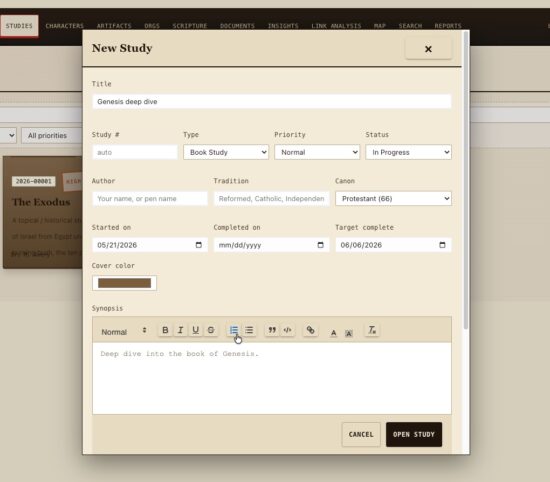
At the heart of is the concept of a Study — a dedicated research workspace you create for any biblical topic, book, person, theme, prophecy, or question. Each Study becomes a living dossier you populate with scripture references, notes, characters, locations, events, documents, and more. You can work with multiple Studies simultaneously as needed, each with its own dedicated content and status tracking. For example, ready for a deep dive into Genesis? Start a Genesis Study and use BibleLab Research Pro to take your research further than you’ve ever imagined possible. Want to really get to know Paul? Do a study of Paul, complete with a timeline of his activities, a map of his movements, and a link analysis of all people, locations, or events that Paul was involved with. BibleLab Research Pro represents a complete paradigm shift for Bible study.
The Bible Reader with Commentaries & Lexicons
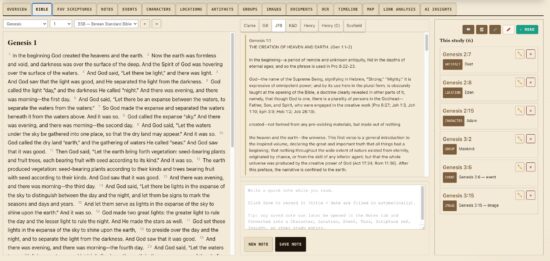
BibleLab Research Pro includes a powerful, multi-column Bible reader that connects directly to your Studies. As you read, a Commentary Pane sits alongside the text, offering verse-by-verse commentary from a curated library of classic scholars, including:
- Jamieson-Fausset-Brown (JFB) Commentary
- Matthew Henry’s Commentary and Matthew Henry’s Concise Commentary
- Albert Barnes’ Notes on the New Testament
- John Gill’s Exposition of the Old and New Testaments
- Adam Clarke Bible Commentary
- Keil & Delitzsch Old Testament Commentary
- Scofield Reference Notes (1917)
The commentary pane auto-scrolls in sync with your Bible reading, keeping the relevant verse commentary always in view — though you can unlink it to scroll independently. Premium subscription tiers unlock additional commentaries.
Lexicons for Original Language Study

Alongside the commentaries, integrates biblical lexicons directly into the reader, including:
- Brown-Driver-Briggs Hebrew-English Lexicon (BDB) for Old Testament Hebrew
- Strong’s Greek Dictionary for New Testament Greek
You can search either lexicon by Strong’s number directly from the reading pane, and clicking any tagged word in the biblical text opens its lexicon entry as a popup — putting the original language meaning right at your fingertips without leaving your study.
Bible Reading Tracker

BibleLab Research Pro includes a Bible Reading Progress Tracker that logs which chapters you have read, tracks your current reading streak, and displays your progress by book across both the Old and New Testaments. A daily activity chart covering the last 90 days and per-testament coverage summaries help you stay consistent and see exactly where you’ve been in Scripture.
Research Management Modules
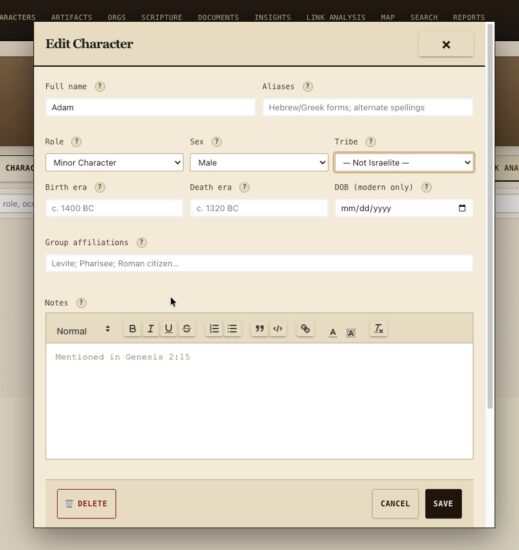
Each Study in has a full set of tabbed research modules:
- Overview — A synopsis panel with rich-text editing, sentiment analysis, risk scoring, and study statistics
- Characters (People) — A full character database where you profile biblical figures, assign roles, affiliations, and track which Studies they appear in; includes duplicate-detection and merge tools
- Locations — Map and catalog every biblical location with coordinates, type classifications, and cultural notes
- Events — Log and organize biblical events with types, dates, and linked entities; events can be added to timelines, too
- Artifacts — Catalog biblical objects, relics, and items with material type, culture, owner, and catalog number
- Groups/Organizations — Manage tribes, factions, political groups, religious sects, and biblical genealogical families with leadership notes
- Scripture Vault — A personal Digital Scripture Vault where you collect and annotate key verses by type, credibility, and reference
- Documents — Upload and manage study religious documents with OCR (optical character recognition) that extracts text for searching
- Images/Photos — Upload and study photos and historic illustrations with a built-in lightbox viewer and a magnifier tool
- Notes — A rich-text note-taking system with the ability to convert notes into Characters, Locations, Events, Tasks, Scripture References, and other study entities
- Tasks & Action Items — Track follow-ups, open research questions, and to-do items with due dates and priority levels
Timeline Builder

The Timeline module lets you arrange biblical events into a visual, chronological timeline for each Study. You select which events to include, and the timeline renders them in a scrollable, interactive view. Multiple named timelines can be created per study helping you put the Bible’s events in perspective.
Interactive Map
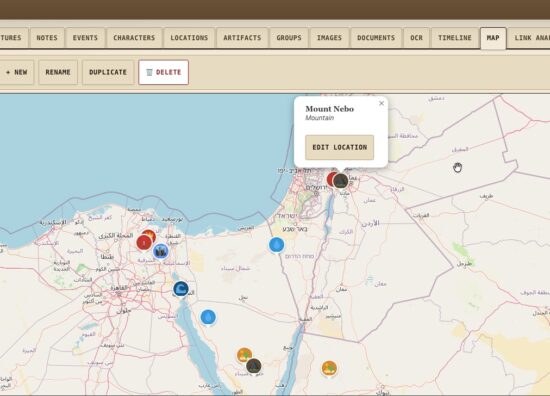
The Map module uses Leaflet-powered interactive maps where you can:
- Plot biblical locations with custom pins
- Measure distances between points
- Draw lines and routes
- Save and name multiple map views per Study
- Switch between standard and satellite map layers
- Enter fullscreen mode for detailed examination
Link Analysis Graph

The Graph module renders a visual relationship network for each Study — nodes representing characters, locations, groups, and events, with edges showing relationships between them. You can add and edit relationships directly on the graph canvas, apply physics-based layout for automatic node positioning, and zoom/pan to explore connections. This is especially powerful for tracing how biblical figures are connected across genealogies, events, and narrative arcs.
AI Insights Engine

BibleLab Research Pro’s AI tab inside each Study generates heuristic intelligence about your research, including:
- Study Highlights — Automatically identified observations about recurring figures, scripture coverage gaps, theme convergence, and reading-plan momentum
- Suggested Links — AI-recommended relationships between entities in your Study that you may have missed
- Research Depth – AI analyzes your research and lets you know how complete your study is. Hit 100% and you’re a scholarly pro!
- Callouts can be dismissed, ignored, or cleared so the AI insights stay fresh and relevant
Global Dashboard & Reports
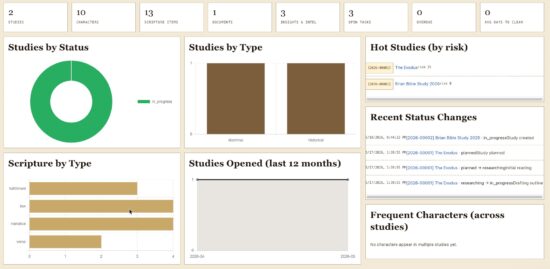
The BibleLab Research Pro Dashboard gives you a bird’s-eye view across all your Studies:
- Studies by status, type, and priority
- Open tasks and overdue items
- Recent status changes and activity log
- Hot Studies by risk score and stale Studies by age
- Hotspot locations and frequently appearing characters
- Studies opened per month over the last 12 months
The Reports module surfaces the same aggregated statistics in a printable view for sharing or archiving your research.
Subscription Tiers & Access
BibleLab Research Pro operates on a tiered subscription model. Core features are available for FREE to registered users, while premium plan tiers unlock additional Bible translations, advanced commentaries, and expanded lexicon access. A read-only share link feature allows you to share any Study with others without requiring them to have an account.
Compare the plans
Compare plans
| Free Free |
Starter $1.95/mo |
Scholar $2.95/mo |
Small Group $4.95/mo |
Seminary $7.95/mo |
|
|---|---|---|---|---|---|
| Limits | |||||
| Studies you can own | 1 | 3 | 15 | 50 | Unlimited |
| Shares per study | — | 2 | 10 | Unlimited | Unlimited |
| Attachment storage | 100 MB | 1 GB | 10 GB | 24.6 GB | Unlimited |
| Public read-only links | — | — | — | ✓ | ✓ |
| Bibles | |||||
| Ball — Light from the East | — | — | — | — | ✓ |
| Book of Mormon (1830) | — | — | ✓ | ✓ | ✓ |
| Breasted — Ancient Records of Egypt; A History of Egypt | — | — | — | — | ✓ |
| Budge — Egyptian religion and Babylonian legend | — | — | — | — | ✓ |
| Chizkuni (Hezekiah ben Manoah) | ✓ | ✓ | ✓ | ✓ | ✓ |
| Cory's Ancient Fragments (1876, OCR) | — | — | — | ✓ | ✓ |
| Cassius Dio — Roman History, Books 36–80 (Foster) | — | — | — | ✓ | ✓ |
| Eusebius — Church History, Martyrs of Palestine, Life of Constantine (McGiffert/Richardson, NPNF2-01) | — | — | — | ✓ | ✓ |
| Herodotus — The Histories (Macaulay) | — | — | — | — | ✓ |
| Jewish philosophy and law (Maimonides, Halevi, Sefer Yetzirah) | ✓ | ✓ | ✓ | ✓ | ✓ |
| Josephus — Complete Works (Whiston translation) | — | — | ✓ | ✓ | ✓ |
| Juvenal — Satires (Ramsay) | ✓ | ✓ | ✓ | ✓ | ✓ |
| King — Legends of Babylon and Egypt; Babylonian Religion and Mythology | — | — | — | — | ✓ |
| Livy — The History of Rome (Roberts) | — | — | — | — | ✓ |
| Luckenbill — Ancient Records of Assyria and Babylonia (OCR) | — | — | — | — | ✓ |
| Midrash (Sefaria translations) | — | ✓ | ✓ | ✓ | ✓ |
| The Mishnah (Kulp translation) | — | — | ✓ | ✓ | ✓ |
| Sulpitius Severus, Vincent of Lérins, John Cassian (NPNF Series II, vol. 11, 1894) | ✓ | ✓ | ✓ | ✓ | ✓ |
| Or HaChaim (Chaim ibn Attar) | ✓ | ✓ | ✓ | ✓ | ✓ |
| Philo of Alexandria — Works (Yonge translation) | — | — | — | — | ✓ |
| Pinches — The Old Testament in the Light of the Historical Records of Assyria and Babylonia | — | — | — | ✓ | ✓ |
| Pliny the Younger — Letters (Firth) | ✓ | ✓ | ✓ | ✓ | ✓ |
| Plutarch — Lives of the Noble Grecians and Romans (Dryden, rev. Clough) | — | — | — | ✓ | ✓ |
| Polybius — The Histories (Shuckburgh) | — | — | — | — | ✓ |
| Pseudepigrapha (Charles) | — | ✓ | ✓ | ✓ | ✓ |
| Radak (David Kimhi) | ✓ | ✓ | ✓ | ✓ | ✓ |
| Ramban (Nachmanides) on the Torah | ✓ | ✓ | ✓ | ✓ | ✓ |
| Rashi on the Bible (Rosenbaum–Silbermann; Judaica Press) | — | — | ✓ | ✓ | ✓ |
| Rawlinson — The Seven Great Monarchies of the Ancient Eastern World | — | — | — | — | ✓ |
| Rogers — Cuneiform Parallels to the Old Testament; A History of Babylonia and Assyria | — | ✓ | — | — | ✓ |
| Sayce — The Higher Criticism and the Monuments; Babylonians and Assyrians | — | — | — | ✓ | ✓ |
| George Smith — The Chaldean Account of Genesis | — | — | — | — | ✓ |
| Strabo — Geography (Hamilton & Falconer) | — | — | ✓ | ✓ | ✓ |
| Suetonius — The Lives of the Twelve Caesars (Thomson, rev. Forester) | — | — | — | — | ✓ |
| Tacitus — Annals and Histories (Church & Brodribb) | — | — | ✓ | ✓ | ✓ |
| The Targums (Etheridge's Pseudo-Jonathan; the 1871 Isaiah) | ✓ | ✓ | ✓ | ✓ | ✓ |
| The Tosefta (Sefaria community translation) | — | ✓ | ✓ | ✓ | ✓ |
| Wilkinson — The Manners and Customs of the Ancient Egyptians | — | — | — | — | ✓ |
| Xenophon — Cyropaedia, Anabasis, Hellenica (Dakyns) | — | — | — | — | ✓ |
| Apostolic Fathers (Roberts-Donaldson) | — | — | — | ✓ | ✓ |
| American King James Version | ✓ | ✓ | ✓ | ✓ | ✓ |
| American Standard Version | — | — | ✓ | ✓ | ✓ |
| Berean Standard Bible | ✓ | ✓ | ✓ | ✓ | ✓ |
| Catholic Public Domain Version | ✓ | ✓ | ✓ | ✓ | ✓ |
| Darby Bible Translation | — | — | ✓ | ✓ | ✓ |
| Douay-Rheims Bible | — | — | — | ✓ | ✓ |
| English Revised Version (1885) | — | — | ✓ | ✓ | ✓ |
| Geneva Bible (1599) | — | ✓ | ✓ | ✓ | ✓ |
| JPS Tanakh (1917) | — | ✓ | ✓ | ✓ | ✓ |
| King James Version with Apocrypha | — | — | ✓ | ✓ | ✓ |
| King James Version (plain text, no Strong's tags) | ✓ | ✓ | ✓ | ✓ | ✓ |
| James Murdock's Translation of the Syriac Peshitta | — | ✓ | ✓ | ✓ | ✓ |
| New Heart English Bible | — | ✓ | ✓ | ✓ | ✓ |
| 1869 Noyes Translation | — | ✓ | ✓ | ✓ | ✓ |
| Open English Bible (US Edition, partial — NT + Psalms + select OT) | — | — | ✓ | ✓ | ✓ |
| The Emphasised Bible by J. B. Rotherham | — | ✓ | ✓ | ✓ | ✓ |
| Smith's Literal Translation | — | ✓ | ✓ | ✓ | ✓ |
| William Tyndale Bible (1525/1530) | — | ✓ | ✓ | ✓ | ✓ |
| Webster Bible Translation | — | ✓ | ✓ | ✓ | ✓ |
| World English Bible | ✓ | ✓ | ✓ | ✓ | ✓ |
| World English Bible (Catholic) | — | — | — | ✓ | ✓ |
| Weymouth New Testament | — | — | ✓ | ✓ | ✓ |
| 1770 John Worsley NT | — | ✓ | ✓ | ✓ | ✓ |
| Young's Literal Translation | — | — | ✓ | ✓ | ✓ |
| Ancient Texts (admin-only) | — | ✓ | ✓ | ✓ | ✓ |
| ANF vol. 2 — Hermas, Tatian, Athenagoras, Theophilus, Clement of Alexandria | — | ✓ | ✓ | ✓ | ✓ |
| ANF vol. 3 — Tertullian I | — | — | ✓ | ✓ | ✓ |
| ANF vol. 4 — Tertullian IV, Minucius Felix, Commodian, Origen | — | — | — | — | ✓ |
| ANF vol. 5 — Hippolytus, Cyprian, Caius, Novatian | — | ✓ | ✓ | ✓ | ✓ |
| ANF vol. 6 — Gregory Thaumaturgus, Dionysius, Julius Africanus, Methodius, Arnobius | — | — | — | ✓ | ✓ |
| ANF vol. 7 — Lactantius, Venantius, Asterius, Victorinus, Apostolic Teaching and Constitutions, Liturgies | — | — | — | ✓ | ✓ |
| ANF vol. 8 — Twelve Patriarchs, Clementina, Apocrypha, Decretals, Memoirs of Edessa | — | ✓ | ✓ | ✓ | ✓ |
| ANF vol. 9 — Gospel of Peter, Diatessaron, Apocalypses, Visio Pauli, Origen's Commentaries | — | — | ✓ | ✓ | ✓ |
| Christian Classics Ethereal Library | — | ✓ | ✓ | ✓ | ✓ |
| Book of Enoch — R. Laurence tr. (1821) | — | — | — | ✓ | ✓ |
| Irenaeus — Against Heresies (Roberts-Donaldson) | — | — | — | — | ✓ |
| Jerome — Letters and Select Works (NPNF, Schaff/Wace) | — | — | ✓ | ✓ | ✓ |
| Justin Martyr (Roberts-Donaldson) | — | ✓ | ✓ | ✓ | ✓ |
| NPNF1 vol. 1 — Augustine: Confessions, Letters | — | — | ✓ | ✓ | ✓ |
| NPNF1 vol. 2 — Augustine: City of God, Christian Doctrine | — | — | — | ✓ | ✓ |
| NPNF1 vol. 3 — Augustine: On the Trinity, Doctrinal and Moral Treatises | — | — | — | ✓ | ✓ |
| NPNF1 vol. 4 — Augustine: Anti-Manichaean and Anti-Donatist Writings | — | — | ✓ | ✓ | ✓ |
| NPNF1 vol. 5 — Augustine: Anti-Pelagian Writings | — | ✓ | ✓ | ✓ | ✓ |
| NPNF1 vol. 6 — Augustine: Sermon on the Mount, Harmony of the Gospels, Homilies on the Gospels | — | — | — | ✓ | ✓ |
| NPNF1 vol. 7 — Augustine: Homilies on John and 1 John, Soliloquies | — | — | ✓ | ✓ | ✓ |
| NPNF1 vol. 8 — Augustine: Expositions on the Psalms | — | ✓ | ✓ | ✓ | ✓ |
| NPNF1 vol. 9 — Chrysostom: On the Priesthood, Ascetic Treatises, Homilies on the Statues | — | — | ✓ | ✓ | ✓ |
| NPNF1 vol. 10 — Chrysostom: Homilies on Matthew | — | — | — | ✓ | ✓ |
| NPNF1 vol. 11 — Chrysostom: Homilies on Acts and Romans | — | — | — | ✓ | ✓ |
| NPNF1 vol. 12 — Chrysostom: Homilies on 1 and 2 Corinthians | — | — | — | — | ✓ |
| NPNF1 vol. 13 — Chrysostom: Homilies on Galatians to Philemon | — | ✓ | ✓ | ✓ | ✓ |
| NPNF1 vol. 14 — Chrysostom: Homilies on John and Hebrews | — | — | — | ✓ | ✓ |
| NPNF2 vol. 2 — Socrates and Sozomen: Church Histories | — | — | — | — | ✓ |
| NPNF2 vol. 3 — Theodoret, Jerome, Gennadius, Rufinus | — | ✓ | ✓ | ✓ | ✓ |
| NPNF2 vol. 4 — Athanasius | — | — | ✓ | ✓ | ✓ |
| NPNF2 vol. 5 — Gregory of Nyssa | — | — | — | ✓ | ✓ |
| NPNF2 vol. 7 — Cyril of Jerusalem, Gregory Nazianzen | — | ✓ | ✓ | ✓ | ✓ |
| NPNF2 vol. 8 — Basil: Letters and Select Works | — | — | ✓ | ✓ | ✓ |
| NPNF2 vol. 9 — Hilary of Poitiers, John of Damascus | — | — | — | — | ✓ |
| NPNF2 vol. 10 — Ambrose | — | — | — | ✓ | ✓ |
| NPNF2 vol. 12 — Leo the Great, Gregory the Great I | — | — | — | — | ✓ |
| NPNF2 vol. 13 — Gregory the Great II, Ephraim Syrus, Aphrahat | ✓ | ✓ | ✓ | ✓ | ✓ |
| NPNF2 vol. 14 — The Seven Ecumenical Councils | — | ✓ | ✓ | ✓ | ✓ |
| Commentaries | |||||
| Illustrated New Testament | — | ✓ | ✓ | ✓ | ✓ |
| Alford's Greek Testament Critical Exegetical Commentary | — | ✓ | ✓ | ✓ | ✓ |
| Albert Barnes' Notes on the Bible | — | — | — | — | ✓ |
| Bengel's Gnomon of the New Testament | — | ✓ | ✓ | ✓ | ✓ |
| Joseph Benson's Commentary | — | ✓ | ✓ | ✓ | ✓ |
| Burkitt's Expository Notes | — | ✓ | ✓ | ✓ | ✓ |
| John Calvin's Commentaries | ✓ | ✓ | ✓ | ✓ | ✓ |
| The Cambridge Bible for Schools and Colleges | — | ✓ | ✓ | ✓ | ✓ |
| Catena Aurea (Thomas Aquinas) | — | ✓ | ✓ | ✓ | ✓ |
| The Homilies of St. John Chrysostom | — | ✓ | ✓ | ✓ | ✓ |
| Adam Clarke Bible Commentary | — | — | — | — | ✓ |
| Darby — Synopsis of the Books of the Bible | — | ✓ | ✓ | ✓ | ✓ |
| Darby Translation Notes | — | ✓ | ✓ | ✓ | ✓ |
| Nicoll's Expositor's Dictionary of Texts | — | ✓ | ✓ | ✓ | ✓ |
| The Expositor's Greek Testament | — | ✓ | ✓ | ✓ | ✓ |
| Ellicott's Commentary for English Readers | — | ✓ | ✓ | ✓ | ✓ |
| The Expositor's Bible | — | ✓ | ✓ | ✓ | ✓ |
| Gaebelein's Annotated Bible | — | ✓ | ✓ | ✓ | ✓ |
| Geneva Study Bible Notes | — | ✓ | ✓ | ✓ | ✓ |
| John Gill's Exposition of the Old and New Testaments | — | — | — | ✓ | ✓ |
| Gray's Concise Bible Commentary | ✓ | ✓ | ✓ | ✓ | ✓ |
| Haydock's Catholic Bible Commentary | — | ✓ | ✓ | ✓ | ✓ |
| Jamieson-Fausset-Brown Commentary | — | — | ✓ | ✓ | ✓ |
| Keil & Delitzsch Old Testament Commentary | — | ✓ | ✓ | ✓ | ✓ |
| Kelly Commentary on Books of the Bible | — | ✓ | ✓ | ✓ | ✓ |
| John Lightfoot Commentary | — | ✓ | ✓ | ✓ | ✓ |
| Luther's Commentary on Selected Bible Passages | — | ✓ | ✓ | ✓ | ✓ |
| MacLaren's Expositions of Holy Scripture | — | ✓ | ✓ | ✓ | ✓ |
| Meyer's Critical and Exegetical Commentary on the New Testament | — | ✓ | ✓ | ✓ | ✓ |
| Matthew Henry's Commentary | — | ✓ | ✓ | ✓ | ✓ |
| Matthew Henry's Concise Commentary | ✓ | ✓ | ✓ | ✓ | ✓ |
| Parker's The People's Bible | — | ✓ | ✓ | ✓ | ✓ |
| The People's New Testament | — | — | — | ✓ | ✓ |
| Matthew Poole's Commentary | ✓ | ✓ | ✓ | ✓ | ✓ |
| The Pulpit Commentary | ✓ | ✓ | ✓ | ✓ | ✓ |
| Scripture Passages Quoting Scripture | — | ✓ | ✓ | ✓ | ✓ |
| Nicoll's Sermon Bible | — | ✓ | ✓ | ✓ | ✓ |
| Tischendorf's Spurious Passages of the GNT | — | ✓ | ✓ | ✓ | ✓ |
| C. H. Spurgeon's Treasury of David | — | ✓ | ✓ | ✓ | ✓ |
| The Fourfold Gospel and Commentary on Acts of Apostles | — | ✓ | ✓ | ✓ | ✓ |
| Treasury of Scripture Knowledge | — | ✓ | ✓ | ✓ | ✓ |
| Tyndale Open Study Notes | — | ✓ | ✓ | ✓ | ✓ |
| Vincent's Word Studies in the New Testament | — | ✓ | ✓ | ✓ | ✓ |
| John Wesley's Explanatory Notes | ✓ | ✓ | ✓ | ✓ | ✓ |
| Scofield Reference Notes (1917) | — | — | — | — | ✓ |
| Bible Blender Commentary | ✓ | ✓ | ✓ | ✓ | ✓ |
| Lexicons | |||||
| G. Abbott-Smith's A Manual Greek Lexicon (with Strongs) of the New Testament | — | ✓ | ✓ | ✓ | ✓ |
| Brown-Driver-Briggs Hebrew-English Lexicon | — | — | — | ✓ | ✓ |
| Dodson Greek-English Lexicon | — | ✓ | ✓ | ✓ | ✓ |
| An Intermediate Greek–English Lexicon Keyed to Strong's Numbers | — | ✓ | ✓ | ✓ | ✓ |
| Strong's Greek Dictionary (NT) | — | — | — | ✓ | ✓ |
| Features | |||||
| Concordance | ✓ | ✓ | ✓ | ✓ | ✓ |
| Define a word in the commentaries | — | ✓ | ✓ | ✓ | ✓ |
| AI Insights | — | — | — | ✓ | ✓ |
| Link Analysis | — | — | — | ✓ | ✓ |
| Image attachments | — | — | ✓ | ✓ | ✓ |
| Document attachments | — | — | — | ✓ | ✓ |
| OCR | — | — | — | — | ✓ |
| Reference: Easton's Bible Dictionary | ✓ | ✓ | ✓ | ✓ | ✓ |
| Reference: Hitchcock's Bible Names | — | — | ✓ | ✓ | ✓ |
| Reference: International Standard Bible Encyclopedia | — | ✓ | ✓ | ✓ | ✓ |
| Reference: Naveߴs Topical Bible | ✓ | ✓ | ✓ | ✓ | ✓ |
| Reference: Smith's Bible Dictionary | — | ✓ | ✓ | ✓ | ✓ |
| Reference: R. A. Torrey's New Topical Textbook | ✓ | ✓ | ✓ | ✓ | ✓ |
| Reference: Webster's 1913 Revised Unabridged Dictionary of the English Language | — | ✓ | ✓ | ✓ | ✓ |
Questions
What do I get for free?
A free account gives you one study of your own, the public-domain Bibles and commentaries marked above, and read access to any study shared with you or published on the site. No card is asked for.
What is a "study"?
A study is a workspace for one topic, book, person or question: its own notes, highlights, characters, locations, events, timeline, map and documents, all tied to the verses they concern. Characters, locations, artifacts and groups are shared across your studies; notes and events belong to the study they were written in.
What are shares and public links?
A share gives a named account read access to one of your studies. A public read-only link lets anyone with the link read it, no account needed. Neither lets anyone edit your work.
How do I pay?
Payment is handled by Stripe on its hosted checkout page. Your card details are entered there and never touch this site. Plans are billed monthly or yearly, your choice.
Can I cancel?
Yes, at any time, from this page or the Stripe customer portal. You keep the plan's features until the end of the period you have already paid for; nothing renews after that.
Can I change plans later?
Yes. Upgrade or downgrade through the Stripe customer portal ("Manage in Stripe" on this page once you subscribe). Your studies and notes stay in your account whichever plan you are on.
You must be logged in to post a comment.